
|
|

|
GASVENT FEATURES
|

|
|
The Elite Software GASVENT 2.0 program quickly calculates the correct vent sizes for Category 1 Gas Fired Appliances. GASVENT is a true Windows program designed to be simple and easy to use by both contractors and designers. The program is very graphical and especially easy to use. Recent advances in technology have improved the average furnace efficiency to over 80%. These new mid and high efficiency furnaces can cause significant condensation in the vent. If a flue gas vent is either oversized, undersized, or of the wrong material, there is a high probability that corrosive condensate will cause pitting which will ultimately result in the failure of the vent pipe. The failure of a vent pipe can be deadly because the building occupants could be subjected to carbon monoxide poisoning. Besides gas poisoning, there are many other hazards from improperly designed vents. Masonry chimneys can collapse from the acid in the condensate dissolving the mortar between bricks and possibly causing a fire. Condensate can accumulate back at the furnace and cause severe rusting. There are so many potential problems with incorrect venting, that all contractors should make every effort to do the job right. GASVENT is a great help in vent design. GASVENT UPDATECurrent users of Windows GASVENT 1.50 may update to GASVENT 2.0 for only $49. The primary differences between GASVENT versions 1.5 and 2.0 concern new calculation routines, better handled multi-floor and multi-appliance applications, easier entry of manifolds, updated graphics, and new visually appealing reports. Updated graphics, a new manual, and a new help file make GASVENT 2.0 for Windows the easiest to use gas venting program on the market. Stay in compliance with the National Fuel Gas Code the easy way, with GASVENT for Windows! CALCULATION METHODGASVENT calculates vent sizes based on the vent tables developed by the Gas Research Institute and subsequently published in the National Fuel Gas Code by NFPA and the manual entitled, Venting Tables - Category 1 Central Furnaces, published by the Gas Appliance Manufacturers Association. All output results produced by GASVENT can be easily verified by hand to conform with results from the vent tables. PROGRAM INPUT
The GASVENT program uses standard Windows data entry techniques that provide
a full screen, simple "fill in the blank" input procedure. All input data
is checked at the time of entry so that no improper data can be entered.
If you have a question about what the program is requesting, you can press
the F1 key for context sensitive help. Sample Appliance Data Input Screens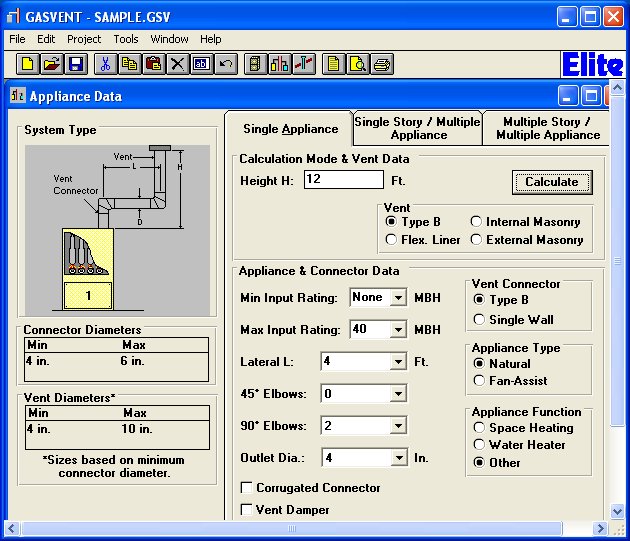 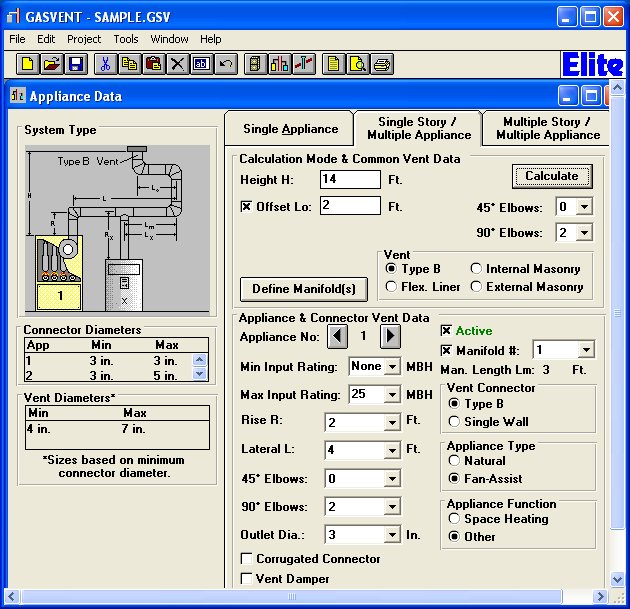
|