PROGRAM OVERVIEW
The Elite Software CHVAC program quickly and accurately calculates the maximum heating and cooling loads for commercial buildings. CHVAC allows an unlimited  number of zones which can be grouped into as many as 100 air handling systems. CHVAC automatically looks up all cooling load and correction factors necessary for computing loads. In addition, the programs can look up outdoor design weather data for over 300 cities located around the world. There is also provision for editing the weather data as well as adding data for other cities. Comprehensive reports list the general project data, detailed zone loads, air handler summary loads, outside air loads, total building loads, building envelope analysis, tonnage requirements, CFM air quantities, chilled water flow rates (if applicable), and complete psychrometric data with entering and leaving coil conditions. Other outstanding features include ASHRAE Standard 62 analysis, automatic building rotation, 360 degree wall orientations, tilted glass, exterior shading, internal operating load profiles, variable indoor design temperatures, people diversity, pretreated outside air, seasonal infiltration and ventilation rates, reheat loads, duct gains and losses, and return air plenums. CHVAC project data files can also be used by Elite Software's EZDOE energy analysis program. A Dos version of CHVAC exists, but it is slightly less capable. number of zones which can be grouped into as many as 100 air handling systems. CHVAC automatically looks up all cooling load and correction factors necessary for computing loads. In addition, the programs can look up outdoor design weather data for over 300 cities located around the world. There is also provision for editing the weather data as well as adding data for other cities. Comprehensive reports list the general project data, detailed zone loads, air handler summary loads, outside air loads, total building loads, building envelope analysis, tonnage requirements, CFM air quantities, chilled water flow rates (if applicable), and complete psychrometric data with entering and leaving coil conditions. Other outstanding features include ASHRAE Standard 62 analysis, automatic building rotation, 360 degree wall orientations, tilted glass, exterior shading, internal operating load profiles, variable indoor design temperatures, people diversity, pretreated outside air, seasonal infiltration and ventilation rates, reheat loads, duct gains and losses, and return air plenums. CHVAC project data files can also be used by Elite Software's EZDOE energy analysis program. A Dos version of CHVAC exists, but it is slightly less capable.
PROGRAM OUTPUT
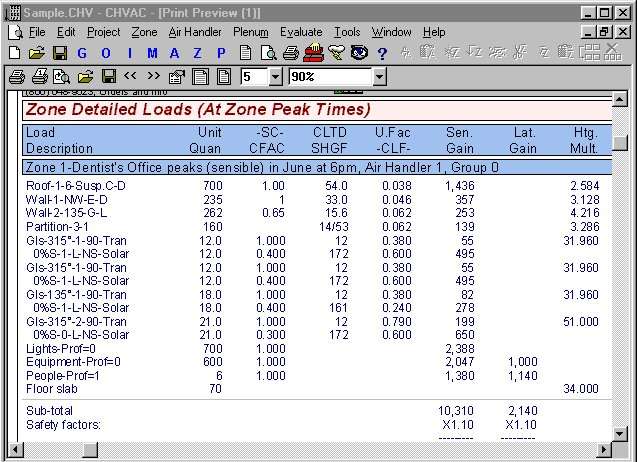
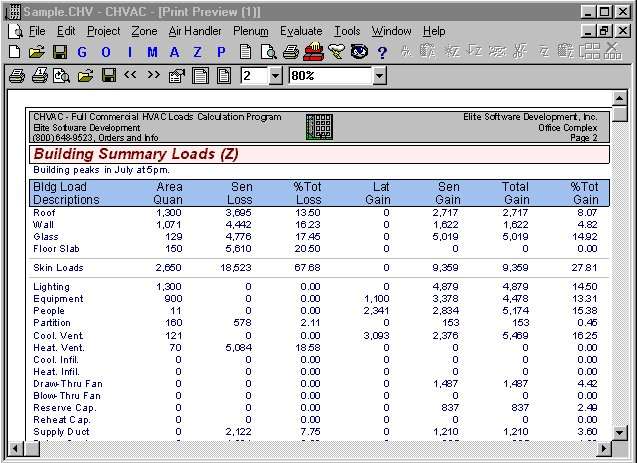
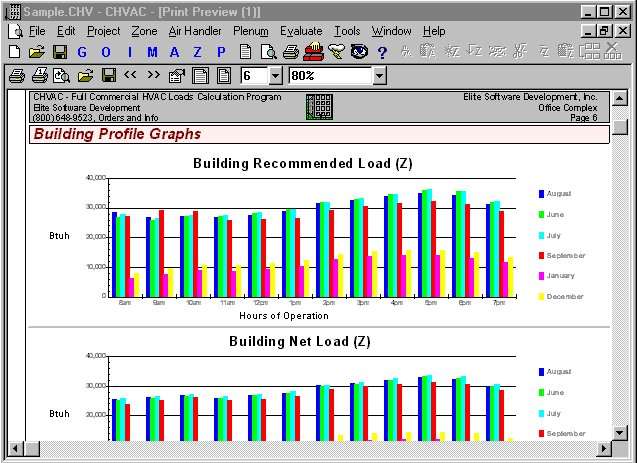
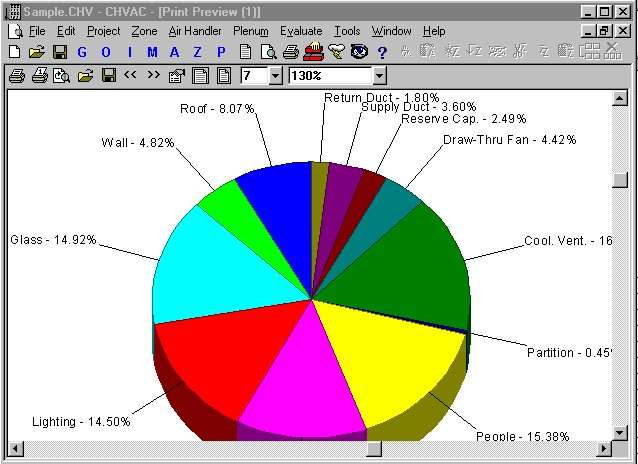
The CHVAC program provides eleven types of reports which can be selectively previewed on screen or printed as desired. CHVAC supports all printers that work with Windows and numerous full color  reports are available. The reports are: General Project Data, Air Handler Input Data, Zone Input Data, Detailed Project Zone Loads, Air System Zone Summary, Total Building, Air System, and Zone Load Profiles, Air System Total Load Summary, Air System Psychrometric
Analysis, Overall Building Envelope Report, Pie Charts, Bar Graphs, and the Total Building Load Summary. Air system summary data can be exported to your favorite spread sheet. See the sample reports below. reports are available. The reports are: General Project Data, Air Handler Input Data, Zone Input Data, Detailed Project Zone Loads, Air System Zone Summary, Total Building, Air System, and Zone Load Profiles, Air System Total Load Summary, Air System Psychrometric
Analysis, Overall Building Envelope Report, Pie Charts, Bar Graphs, and the Total Building Load Summary. Air system summary data can be exported to your favorite spread sheet. See the sample reports below.
PROGRAM INPUT
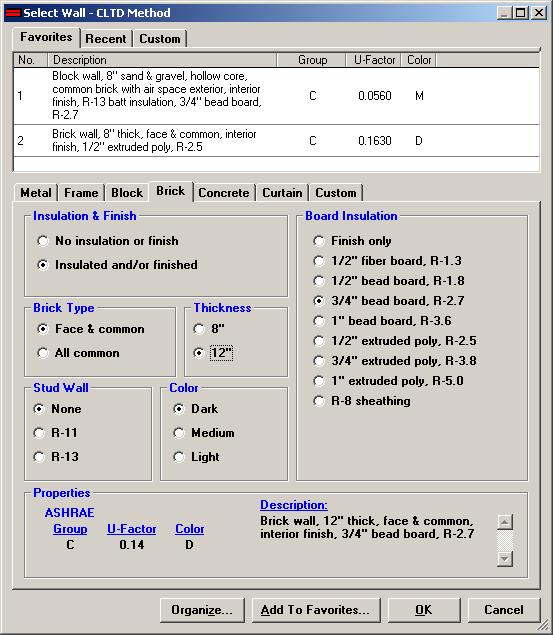
CHVAC is a true Windows program that uses all the latest data entry techniques such as toolbars, hyper linked help, and form tabs. All input data is checked at the time of entry so that no improper data can be entered. Five types of data are requested: general project data, outdoor design data, building material data, air handler data, and specific zone data. The general project data includes the project and client name, designer, building opening and closing hours, internal operating load schedules, and any desired safety factors. The outdoor design data includes the summer and winter outdoor design conditions (automatically looked up for you if a city reference is given) and the desired ventilation and infiltration rates. The building material data includes the definition of master building material types for roofs, walls, partitions, glass sections, and exterior shading. A user defined material library is available for saving the data on common material types. The air handler data includes the fan and terminal type, the desired heating and cooling supply air temperatures and data for duct heat gains and losses. The zone data includes the zone name, floor length and width, number of people, equipment watts, lighting watts, external shading data, and specific roof, wall, partition, floor, and glass data.
CHVAC/QHVAC DIFFERENCES
Although CHVAC is easy to use, it is primarily intended for consulting
engineers and large contractors who preform very sophisticated and detailed HVAC load calculations. On the other hand, QHVAC is a low cost commericial loads program primarily intended for architectesand contractors who design small to medium sized commericial buildings. Both CHVAC and QHVAC follow the ASHRAE calculation procedures, but QHVAC does not have all the many options that CHVAC has, and thus it is somewhat faster and simpler to use.
Some of the main differences are: 1) QHVAC only allows 50 zones grouped
under ten air handling systems, 2)QHVAC does not allow for exterior shading
and tilted glass, 3) QHVAC only accepts wall orientations on the eight
compass directions, 4)QHVAC does not allow variable indoor design temperatures,
5)QHVAC does not allow pretreated outside air, and 6)QHVAC has no provision
for internal load profiles on lights, people, and equipment. To decide
whether QHVAC or CHVAC is more appropriate for your needs, carefully conside
the features of each. If QHVAC is missing just one of the featueres you
need or soon will need, you should use CHVAC as it is almost as easy to
use as QHVAC.
FIVE CHVAC VERSIONS AVAILABLE
There are five versions of the CHVAC program; 2 zone capacity ($295), 10 zone capacity ($395), 50 zone capacity ($595), 100 zone capacity ($995), and unlimited capacity ($1495). Keep in mind that a zone is a single space or room, and that zones can be grouped into air handling systems which in turn make up the building. Zones can optionally be grouped under vav boxes as well.
This allows CHVAC to compute diversified peak loads at four levels in one run of the program: zone, vav box, air system, and total building. The maximum number of air handling systems allowed for any version is the number of zones allowed or 100, whichever is the lesser. Each CHVAC version is exactly the same with the exception of the zone capacity and price. However, there is a generous upgrade policy. If at any time you decide to obtain a version of CHVAC with greater capacity than the original one you obtained, all that is required is to pay the difference in price between the two versions.
|
|
CHVAC FEATURES
- Calculates Peak Heating & Cooling Loads
- Computes CFM Air Quantities With Psychrometrics
- Calculates Runout and Main Trunk Duct Sizes
- Automates Compliance with ASHRAE Standard 62
- CHVAC Calculates in both Metric and English Units
- Allows Simultaneous Infiltration and Ventilation
- Selects Equipment from AR/GAMA Databases
- CHVAC Allows Unlimited No. of Zones per Project
- Zones May be Optionally Grouped Under VAV Boxes
- Allows 12 Walls, 12 Windows, and 5 Roofs per Zone
- Prints Numerous Color Pie Charts and Bar Graphs
- Spreadsheet Output File Compatibility
- Links with both AUDIT and EZDOE Energy Programs
SYSTEM REQUIREMENTS
CHVAC requires a computer system with at least 16 meg of memory and Windows 95 or Windows NT.
CALCULATION METHOD
Both CHVAC and QHVAC perform calculations using the CLTD procedures described
in the ASHRAE Handbook of Fundamentals. The programs use exact CLTD and
MSHGF table values where possible, otherwise direct calculations are made.
This calculation technique allows the programs to calculate for any building
orientation and still produce output results that can be easily verified
by hand.
DEMONSTRATION DISKS
If you would like to evaluate the CHVAC program in further detail, you can order a functional demonstration disk with the complete user manual for only $42. The demonstration disk is just like the full version of the program with the exception of limitations on the size of the data that can be entered. The demo version can also be downloaded without the user manual free of charge. The functional demo version can be "unlocked" into a full version by typing in a password. Please follow these links for descriptions of the demonstration limits for the CHVAC
and QHVACprograms.
ADVANCED FEATURES
CHVAC contains many, many advanced features. Listed below are just some of the capabilities of CHVAC.
- Calculates Peak Heating and Cooling Loads
- Calculates Both Heating & Cooling Cfm Requirements
- Calculates Runout and Main Trunk Duct Sizes
- Automates Compliance with ASHRAE Standard 62
- Provides Overall Building Envelope Report
- Spreadsheet File Compatibility
- Performs Complete Psychrometric Analysis
- Prints Bar Graphs and Exploded Pie Charts
- Exterior Shading Handles Overhangs, Fins, & Glass Tilt
- Uses Exact ASHRAE CLTD Procedures
- Built-in Design Weather Data for Hundreds of Cities
- Analyzes Up to 12 Months Per Calculation
- Calculates 24 Hours per Design Day
- Allows Unlimited Number of Zones per Project
- Zones May Be Grouped Under 100 Air Handlers
- Zones May Be Optionally Grouped Under VAV Boxes
- Allows 12 Walls, 12 Windows, and 5 Roofs per Zone
- Allows Simultaneous Infiltration and Ventilation
- Allows Different Summer and Winter Air Rates
- Allows Varying Indoor Conditions Within a Project
- Allows 6 Master Roof Types, 8 Master Wall Types, 8 Master Partition Types,
and 20 Master Glass Types
- Provides a User Defined Master Material Library
- Allows Up to 10 Internal Operating Load Profiles
- Allows Full 360 Degree Wall and Glass Orientations
- Allows Glass to be titled from 0 to 180 degrees
- Allows for Roof and Wall Color Effects
- Provision for Both VAV and Constant Volume Systems
- Proper Handling of Return Air Plenum Loads
- Accounts for People Diversity in Total Building Load
- Computes Supply Fan Horsepower and Heat Gains
- Accounts for Both Draw-thru and Blow-thru Fans
- Calculates Reheat Requirements if Necessary
- Computes Supply and Return Duct Gains and Losses
-
Allows Direct Specification of Supply CFM Quantiites
-
Allows Specification of Minimum Supply Air Quantities
- Allows Heating Only, Cooling Only, or Both
- Excess Supply Air Can be Handled as Reheat, Reserve Capacity, or by Adjusting the Leaving Coil Conditions
- Leaving Coil Conditions Can be Specified with a Desired Dry Bulb Temperature or a Relative Humidity
- Calculates Chilled and Hot Water Coil Flow Rates
- Allows for Pretreated Outside Air
- Allows Heating and Cooling Safety Factors
- Lighting & Equipment Watts along with No. of People can be Entered
Directly or on a Per Square Foot Basis
- Selects Equipment from the ARI/GAMA Databases
- Creates Custom Sales Proposals
LINKS TO OTHER PROGRAMS
CHVAC not only calculates peak heating and cooling loads, it also aids in selecting hvac equipment and analyzing building operating costs. Project data from CHVAC can be exported to both Elite Software's AUDIT and EZDOE programs. Export to AUDIT when you want to analyze residential and light commercial projects, essentially any application which uses unitary hvac equipment. Export to EZDOE when you want to analyze large commercial projects that require precise modeling of variable loads, equipment, operating schedules, and control schemes. For just selecting unitary hvac equipment, use the built-in feature of reading equipment performance databases published by the American Refrigeration Institute (ARI) and the Gas Appliance Manufacturers Association (GAMA). If you want to create a custom sales proposal, use
the special export feature to Microsoft Office 97/Word. This allows you to take the built-in sales proposal and further customize it.
|