COMPUTERIZED DUCT DESIGN USING AUTOCAD - A PROGRAM REVIEW©
by Sara Sauer

The 1980's saw the advent of computerized HVAC design programs as well as computer aided drafting (CAD) implemented into everyday use of the HVAC engineer. The 1990's will see the complete integration of these design programs in addition to these programs being directly interfaced with CAD. Elite Software's DUCTSIZE program bridges the gap between computer generated load calculations and CAD generated construction documents.
 DUCTSIZE did not just automate a manual method of sizing trunk and runout ductwork, but augmented these procedures with computer capabilities and a step-by-step approach. DUCTSIZE performs an analysis of trunk and runout lengths, fittings and runout air quantities and chooses the optimal duct sizes based upon the user-specified design method. The designer can choose the design methods of static regain, equal friction or constant velocity. The user can even enter an existing system in order to "trouble shoot" problems and possible solutions before any physical modifications are performed. The user has the ability to define systems parameters such as velocity limitations and physical constraints of the ductwork. DUCTSIZE uses the methodology of the 1985 ASHRAE fundamentals. All algorithms are referenced in the program documentation.
DUCTSIZE has significant merit as a stand-alone program, but it goes much further. Coupled with an external interface program, DUCTSIZE has the ability to take all the duct data directly from an AutoCad sketch and pass it directly into the duct sizing program. The external interface program then reads in DUCTSIZE's computed duct sizes and then automatically creates a double line drawing. DUCTSIZE's versatility as a duct sizing program allows this double line generation to accurately reflect the duct geometry, physical characteristics and constraints of a specific project. Several sizing methods and duct layouts can be tried and evaluated with the associated double line drawing while still diminishing manual drafting time considerably.
DUCTSIZE also performs a noise analysis subsequent to the duct sizing operation. The user specifies the fan type and sound power levels. This defines the fan noise source of the duct systems. After the duct system has been calculated and sized by the program, DUCTSIZE then calculates the attenuation achieved through all lengths of ducts and fittings back to the fan. Based upon the user-specified desired NC level at the runout, DUCTSIZE prints a sound report that shows where additional attenuation is required at all runouts. All noise control calculations are based on the 1981 HVAC System Duct Design, published by SMACNA (Sheet Metal and Air Conditioning Contractor's National Association, Inc.)
Installing DUCTSIZE is a simple matter of loading two diskettes into the computer. Elite has included in their documention directions on how to make a back-up disk, create a sub-directory for the program, how to install the program disks and test the installation. An interval program "Elite-In" steps the user through redefining the program to an atypical computer system and allows the user to assign a default drive on which the project files are to reside. Elite-In would benefit greatly if it were an "Install" command that steps the user through the installation and hardware redefinition in one operation.
DUCTSIZE is designed with a menu format. Upon entering the program, the project name must be defined. Once the project is given a unique computer name, a "Master Menu" appears on the computer screen. The Master Menu is simply a succinct selection set from which all input/output data screens are entered.
Project input is classified into four categories: 1) project and default data; 2) system data; 3) trunk data; and 4) runout data. Project data defines default data specific to the project. This includes the trunk sizing method, trunk material reference number, duct geometry, maximum allowable trunk velocities, insulation R-value and maximum allowable NC levels. the system data defines the duct system parameters. This includes the system temperature differential (room leaving temperature-leaving coil temperature), friction loss per 100 feet of duct length, allowable supply air increase and general fan noise data.
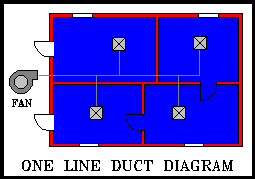
The trunk and runout data can quickly be taken off a one-line sketch by a designer (or draftsman). This one-line sketch is always done at the initial phase of a project and involves very little effort to take these lengths and input them in the trunk/runout data. Along with the runout CFM's (from the HVAC load calculations), this trunk/runout data will serve as the basis for a system review. DUCTSIZE has the unique feature of allowing "active" and "inactive" trunks and runouts. With up to 250 trunks and 250 runouts, this allows the designer to turn off segments of duct system while analyzing another layout without forfeiting all this input. This also aids in analyzing system static pressures where there will be several phases of duct construction.
Each category is entered from the Master Menu. A descriptive text box appears in each subsequent screen so that users are always aware of exactly where they are in the program. This descriptive box reminds users what input is being sought, how to exit the Master Menu, and how to access the help screen for futher assistance.
If users have a question as to what input data is being requested at any point in the program, typing "?" and the enter key will access a help screen. The help screen is a text window describing in concise but complete terms what input is being required at that point in the program. Input can be entered directly from the help screen for ease of reference.
Elite has dynamic error checking that checks for absolute value ranger at the time of input. Due to the extent of applications DUCTSIZE is used for, these absolute ranges are necessarily quite large. Elite could enhance its dynamic error checking by supporting normal ranges in addition to the absolute ranges. Input data outside the normal range would trigger a warning message to users while input data outside the absolute range would be disallowed. These normal and absolute ranges could be incorporated into the help screeen for easy reference.
The entire input may be reviewed to the screen with the "Duct Review" option. This helpful feature allows the user to quickly review all input on the screen rather than wait for an input report.
Project Default Data
The first data entered is project default data. This primarily consists of the default sizing method, maximum velocity limits for trunks/runouts, default material refernce number for trunks/runouts, default size constraints, default duct geometry, duct insulation "R" value and maximum allowable NC level at the runouts. The general values entered in this portion of the program act as default values for subsequent calculations. The use of default values aids in preliminary duct design calculations with minimal input at the trunk/runout level and avoids redundant input. Later entry of the absolute values at the trunk/runout level will override these default values.
Elite Software uses an interesting method of "libraries" that can be shared by all projects occupying the same drive. The material number references a user-specified material library of up to 1,000 entries. Each material reference number is defined by its material type, roughness factor and lining thickness (for subsequent noise calculations). The material type can be defined as steel, aluminum or other (flexible duct, fiberboard, PVC, etc.). This material library also allows the user to define 24 allowable duct sizes, thus disallowing extraneous duct sizes in duct sizing calculations. This material library also allows the user to set up his own simplified duct estimating program of material and labor costs by duct size. Although, DUCTSIZE is not an estimating program per se, it does allow the designer the opportunity to have an estimate that is always running concurrent to the duct design.
System Default Data
The second input and most influential to the overall duct system calculations is the system default data. The duct system data are general parameters for the entire duct system. This consists primarily of maximum and minimum system velocities, minimum trunk diameters, air leaving condition, design room temperature, estimated static pressure loss through the central equipment and loss coefficients for 45 and 90-degree elbows as well as fire dampers. It would be helpful if DUCTSIZE would incorporate a library of ASHRAE Fundamentals standard fitting coefficients. The library could also allow space for user-specified coefficients. This would allow additional fittings with less user input.
A fan is defined in the system data by a reference number from 1-28 or as "0". The fan numbers 1-28 reference a fan library. The fan library is similar to the material library in that all projects on the same drive can access this fan library. Up to 28 general fan types can be defined by the designer. Each fan type is identified by number, description, fan sound power levels and blade frequency increment. This information is used to ascertain the generated noise for subsequent noise calculations. If the fan is defined by the reference number "0", all fan data is input in the system data. This alleviates using a lot of fan types in the library that are project specific rather than fan types common to many projects.
In the system data, the library-referenced fan is further defined to the specific conditions of the project. The fan is defined by the estimated static pressure, CFM, efficiency, RPM, number of fan blades and sound power levels (if type "O"). This information is used to ascertain the fan generated noise specific to this project for subsequent noise calculations.
Trunk Data Input
The third input category is trunk data. Trunk ducts are defined by a unique number with a corresponding upstream trunk duct nunmber. These two inputs allow the computer to "see" how all the trunk ducts interrelate to form a duct system. The trunk duct is defined by its length, the take-off angle (from the upstream trunk), and the number of 45 and 90 degree elbows. The user may specify if a fire damper is present in the trunk or not. The designer has the option of also entering any additional loss coefficients (coils, sound attenuators, special fittings, etc.) and a percent diversity.
The percent diversity allows the designer to specify whether a diversity should be ascribed to certain trunks ducts to reflect the diversity of a VAV system. In this way, the amount of diversity is strictly controlled by the designer.
The designer may choose also to override any project default data at the trunk data input level. This includes the trunk material reference number, maximum air velocity, insulation R-value and maximum height, width and diameter. If the design method in the project default data was the pre-size method, DUCTSIZE will interpret the height X width or diameter as the actual duct sizes for the final calculations. The designer can also choose to override the default sizing method and assign a different sizing method to the trunk ducts shown.
Runout Data Input
Runout ducts are input similar to the trunk ducts. Runout ducts are defined by a unique runout number along with the trunk duct number that it connects to. The runout is further defined by the runout CFM, length, take-off angle from the trunk and the number of 45 and 90 degree elbows. The designer can also enter any additional loss coefficients in the runout input (VAV boxes, diffuser, attenuator, etc.). Because DUCTSIZE does not incorporate any fittings other than the standard 45 and 90 degree elbow, the user must also enter any other fittings losses known at this point.
The user can choose to overide any project default data at the runout level. This includes the runout material reference number, the maximum allowable velocity, R- value of the insulation, duct geometry, maximum allowable NC and the design method. By inputing height X width or diameter with the pre-size design method, DUCTSIZE will interpret these sizes as the actual duct sizes for the final calculations. The designer can choose to override the default sizing method and assign a different sizing method to the runouts chosen.
Input for DUCTSIZE utilizing AutoCad is similar to the above procedures except that all trunk/runout duct take-offs originate from a one-line sketch which is created with AutoCAD drawing aid software available from either DCA Softdesk or ASG. The special HVAC drawing aid software enhances AutoCAD and facilitates the quick creation of a scaled one-line sketch that "shows" the layout of the system trunk and runout ducts. Boxes with associated cfm values are specified at each runout termination point. Once the one-line sketch is complete, the drawing aid software automatically extracts all the trunk and runout data needed by DUCTSIZE to perform sizing calculations.
After the necessary data is extracted from the one-line sktech, the drawing aid software invokes DUCTSIZE so that the sizing calculations can be performed. DUCTSIZE then prints reports and creates a special output file containing duct size information for use with AutoCAD. Exiting from DUCTSIZE automatically returns the designer to AutoCAD where the ASG or DCA drawing aid software again takes over by converting the previous single line sketch into a detailed double line drawing of the duct system.
Calculations
Once all project, system and trunk/runout data has been reviewed and edited, calculations are performed. Any errors in input will be displayed on the computer screen and calculations will be halted. The screen will remain poised on the error message before returning to the Master Menu. This allows the user time to copy down the error message. Elite has included a chapter in the documentation "Troubleshooting" that covers concisely but completely a list of error messages displayed, probable cause and solution. The error messages are a contraction of the input malfunction and are therefore almost self-explanatory.
DUCTSIZE then sorts and computes trunk air quantities by adding up the downstream runouts CFM's. If the designer assigned a supply air diversity for VAV, the program will adjust the trunk and downstream air quantities accordingly. Starting at the first trunk section past the fan, all trunk ducts are sized based upon constant velocity honoring the user-specified velocity constraints. All runouts are then sized with constant velocity.
If the maximum percent supply air increase is non-zero, then heat gains are calculated based upon the preliminary duct sizes, supply air temperature, duct space temperature and duct R-value. The CFM's are adjusted for this heat gain and diversity and then the trunks and runouts are re-sized using constant velocity.
The duct system is then sized section by section based upon the default sizing method or the method assigned to that section alone. The program calculates both the system static and total pressure loss from the fan to the end of each runout.
The noise calculations are now performed based upon the calculated duct sizes, the fan noise source defined in the system datea and the desired NC levels at the runouts. DUCTSIZE traces the duct system from the runout back to the fan, calculating the amount of attenuation achieved through all duct lengths and fittings (lined and unlined). The fan sound power levels minus the attenuation through the system yields the required attenuation at each runout.
Reports
The reports consist of the input report, the output report, sound report and material/labor cost report. The input report reiterates all the input data of the project. This report lists the project lists the project and default data, system data, the fan library data, material library data and the trunk/runout data. No calculated results are shown.
The output report is subdivided into the trunk output report and runout output report. The trunk output report reiterates, in abbreviated terms, the input data of the trunk number, material reference description, length, upstream connection number, the sizing method, the number of 45 and 90 degree elbows and the number of fire dampers. The output report also notes the CFM of the trunk. This air quantity not only reflects the airflow of the downstream duct sections but also whether or not duct heat gain calculations were performed. If the maximum percent supply air increase is non-zero, DUCTSIZE will note the increased airflow to offset the heat gain. If the maximum percent supply air increase is zero, the trunk CFM will merely be the sum of the downstream runout air quantities.
This report also shows the calculated diameter (if the duct geometry is round), the height X width (if the duct geometry is rectangular or oval) and the subsequent velocity. The report also documents the calculated pressure loss for all of the fittings as well as the user-specified additional losses in the trunk. The output report finally documents the cumulative loss in the velocity pressure, static pressure and total pressure for the trunk duct section.
The runout output report shows the results of the duct sizing calculations in addition to the abbreviated input data. The input data consists of the runout number, material reference description, length, the trunk connection number of the runout, the take-off angle from the trunk, the sizing method and the number of 45 and 90 degree elbows. The CFM is as user-specified or increased for heat gain if the maximum supply air increase is non-zero.
The runout output report also shows the calculated diameter (if the duct geometry is round), the height X width (if the duct geometry is rectangular or oval) and the subsequent runout velocity. The report also documents the calculated pressure loss for all the fittings and the user-specified additional losses in the runout. The output report also documents the cumulative loss in velocity pressure, static pressure and total pressure for the runout section. The output report finally documents the maximum allowable NC level as input and the calculated NC level achieved for this particular runout.
The sound report shows the results of the noise control calculations. The report documents the required attenuation to attain the desired NC level, the actual calculated attenuation and the additional amount of attenuation required, if any, to achieve the desired NC level.
The final report is the material/labor costs report is subdivided into round, rectangular and mixed costs report. The round costs report shows the amount of ductwork and the associated material and labor costs to construct the duct system based solely on equivalent round diameters. These sizes are as calculated by DUCTSIZE but are not based on tghe user-specified duct geometry. The rectangular report is similar to the round costs reports except that all the duct sizes are equivalent rectangular sizes.
The mixed duct costs report reflects the calculated duct sizes based upon the duct geometry ascribed to each trunk and runout section. The report documents the calculated size, the total number of feet in the duct system of that size, the material reference number, guage, total area in square feet and the total weight in pounds for the sized listed. The report documents the number and type of fittings and fire dampers with the corresponding material, labor and total costs.
Final Evaluation
Overall, I found Elite's DUCTSIZE to be a complete and flexible duct sizing program without sacrificing ease of use in the process. Technically, DUCTSIZE utilized industry standard methodology and documented the program methodology in the user's manual. A sample project file is included on the program disks. The program's calculations for the sample project are clearly documented step-by-step in the user's manual to verify all program results.
DUCTSIZE's utilization of all sizing methods in addition to existing systems allows the designer greater flexibility in evaluating the best and most exciting CAD software programs in the HVAC design environment.
Mr. Smith welcomes your email about this article. - email
Copyright ©
Elite Software Development, Inc., webmaster@elitesoft.com