|
|

RHVAC FEATURES
|
 |
The Elite Software RHVAC Program quickly and accurately calculates peak heating and cooling loads for residential and small commercial buildings in accordance with the seventh edition of the ACCA Manual J. The Heat Transfer Multipliers (HTM values) for all the walls, windows, doors, and roofs listed in Manual J are stored on disk and automatically looked up by the program as needed. Although HTM values are taken from Manual J directly, the user does have the option of entering his own U-Value for each wall, roof, or glass section so that a modified HTM value is used. Design weather data for over 1500 cities is built-in to the program. In addition, the user can revise the existing weather data and add additional weather data as desired. Zoning cfm adjustments are automatically handled by the program as needed. Other outstanding features include exterior glass shading, ventilation air, miscellaneous latent loads, default room data, automatic rotation of the entire building, hydronic heat calculations and much more.
Besides calculating peak heating and cooling loads, RHVAC also performs runout and main trunk duct sizing, creates sales proposals and selects hvac equipment. Duct sizing options include all types of duct materials, height and width restrictions, velocity limits, and more. For equipment selection, RHVAC is provided with a database derived from ARI and GAMA of thousands of equipment models from over 80 hvac manufacturers. Standard air conditioners, heat pumps, furnaces, boilers, and ground source heat pumps are among the types of equipment RHVAC can select. The sales proposal feature of RHVAC prints key features of the proposed equipment and work to be performed. Also included are standard terms and conditions of the proposal.
RHVAC shares data with Elite Software's AUDIT operating cost analysis program, DUCTSIZE, Quick Quote, and Drawing Board program. Run RHVAC stand alone or use it in conjunction with any of these programs.
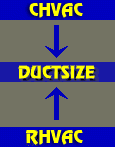 We've also just added a new feature for DUCTSIZE that allows for automatic We've also just added a new feature for DUCTSIZE that allows for automatic  import of data from our load calculation programs. DUCTSIZE users can now easily import Project, Client, Company and room supply airflow data from Elite's RHVAC program directly into DUCTSIZE with just a few clicks of the mouse. This new feature means that data is entered once and then readily used in
DUCTSIZE. It also greatly facilitates the design of a complete duct system for a project that you have entered in RHVAC by using the precise runout airflows that those programs have already calculated for you. Read the full press release here! import of data from our load calculation programs. DUCTSIZE users can now easily import Project, Client, Company and room supply airflow data from Elite's RHVAC program directly into DUCTSIZE with just a few clicks of the mouse. This new feature means that data is entered once and then readily used in
DUCTSIZE. It also greatly facilitates the design of a complete duct system for a project that you have entered in RHVAC by using the precise runout airflows that those programs have already calculated for you. Read the full press release here! |