Overview
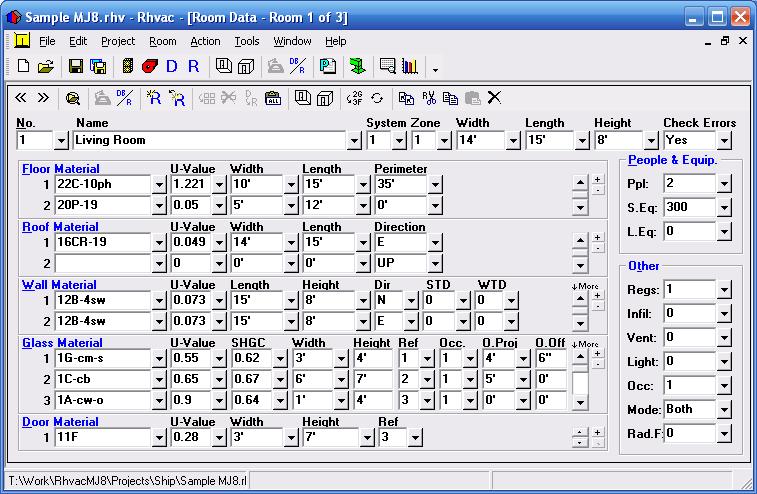
Rhvac is available in both an online and desktop version. The desktop version has a one time fee and works on all Windows computers. Rhvac Online is subscription based and works on all computers, tablets and smartphones with internet connection. The online and desktop versions can import and export project files between each other. Both versions calculate peak heating and cooling loads (both block and room by room) for residential buildings and some light commercial applications in accordance with ACCA Manual J, D, and S. Both versions of Rhvac include a complete ACCA Manual D duct sizing capability and a complete Manual S equipment selection. Data can be manually entered or automatically taken from a floor plan drawn with the optional Drawing Board program (available only within desktop Rhvac). The Heat Transfer Multipliers (HTM values) for all the walls, windows, doors, and roofs listed in Manual J are automatically looked up by the software as needed. Additional construction materials are easily added as well.
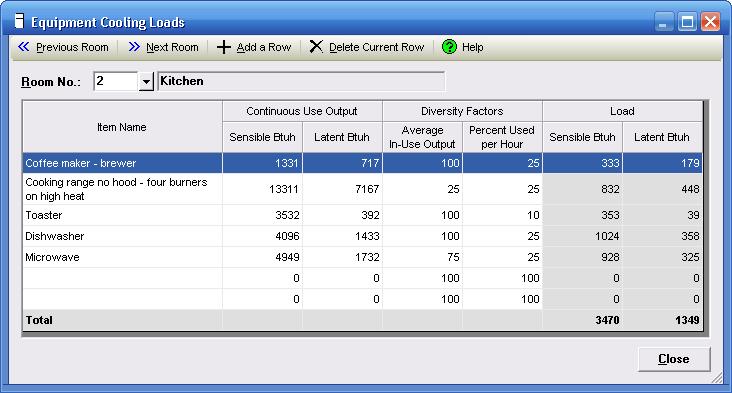
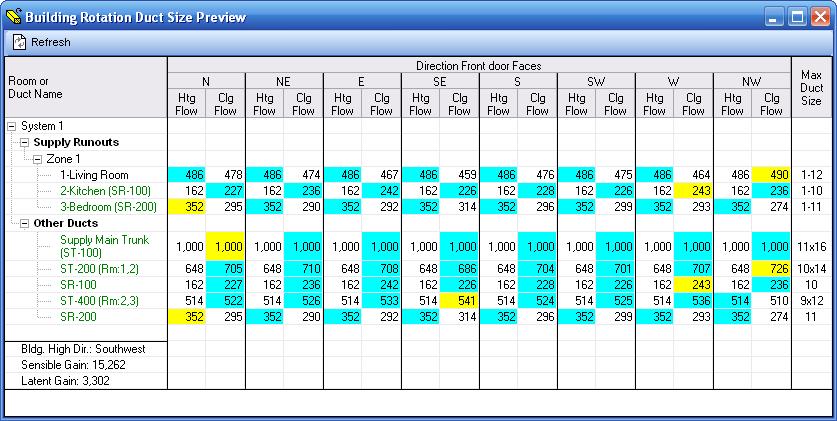
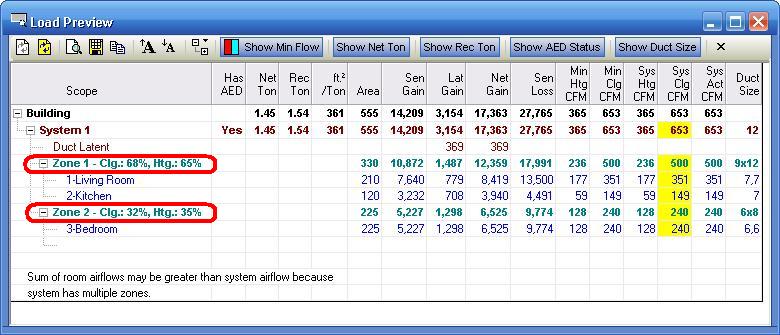
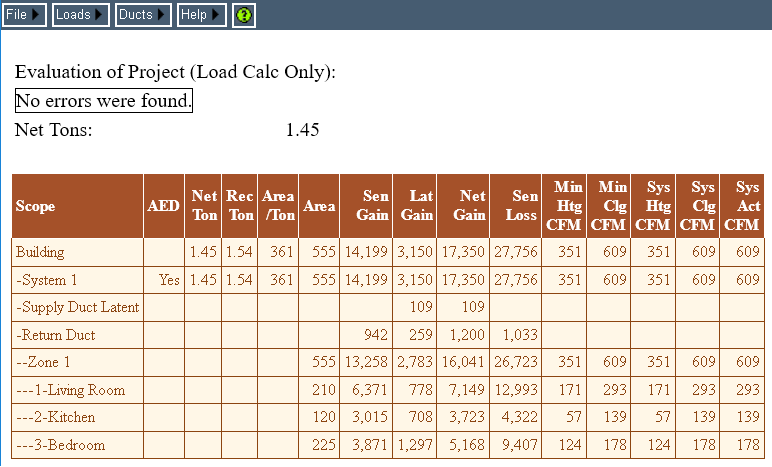
Design weather data for over 2,000 cities is built into the software. In addition, the user can revise the existing weather data and add more data as desired. Drag and drop zoning control is provided through the powerful and graphic Project Explorer feature of Rhvac Desktop. Zoning CFM adjustments are automatically handled by the software as needed. Equipment can be selected from AHRI databases that are included at no extra charge. Comprehensive reports list the general project data, equipment information, total building load summary, detailed room load calculations, and a room load summary for each zone and system complete with heating and cooling CFM values. Color graphic bar graphs and pie charts can be printed as well (Desktop Only). Other features in both Rhvac versions include glass shading, ventilation air, equipment loads, and default room data. Advanced features in Rhvac Desktop include complete rotation or mirroring of the entire building, and the ability to share data with Bill of Materials, Energy Audit, Proposal Maker, EnergyPro, Energy Gauge, REM/Rate, Ekotrope, REScheck, and Energy Star.
Calculation Method
Rhvac's calculations are performed per ACCA Manual J 8th Edition, Version 2, ACCA Manual D, and ACCA Manual S. Rhvac is an ACCA approved Manual J, Manual D and Manual S computer program. Elite Software is a technical software partner with ACCA.
Purchase Options
| Product |
Program
Type |
Manual
J, D & S |
License
Type |
Price |
Purchase |
| Rhvac 10 |
desktop |
J D S |
permanent |
$599 |
 |
| Rhvac Upgrade 10.1 to 10.2 |
desktop |
J D S |
permanent |
$49 |
|
Rhvac 10
Upgrade 9 to 10 |
desktop |
J D S |
permanent |
(varies) |
|
Rhvac 10
Combo with Drawing Board and Graphic Manual D Ductsize |
desktop |
J D S |
permanent |
$999 |
|
| Rhvac 10 (I have Rhvac Online) |
desktop |
J D S |
permanent |
$499 |
|
| Rhvac Online (I don't have Rhvac 10 for Windows) |
online |
J D S |
1 year |
$239 |
|
| Rhvac Online (I have Rhvac 10 for Windows) |
online |
J D S |
1 year |
$159 |
|
| Manual J Calculator Online |
online |
J |
1 year |
$149 |
|
| Manual D Ductsize Online |
online |
D |
1 year |
$89 |
|
| Manual S Calculator Online |
online |
S |
1 year |
$49 |
|
Powered by ACCA Manual D (Ductwork Design)
Rhvac can help you in several ways on sizing ductwork. For those who do not want to enter complete details about a duct system, Rhvac Desktop can still suggest the number of registers needed for each room, the runout duct size leading to each register, and the initial size of the main trunk duct. For example, if a family room is calculated to require 200 CFM, Rhvac will suggest two registers to deliver 100 CFM each. And if flex duct was specified, Rhvac will "spin the ductulator" for you and calculate using the equal friction method that each duct should be 6" in diameter. And if the project needed 1200 CFM total, Rhvac knows that the first part of the main trunk has to carry that much air and it will calculate the main trunk size. Automatically, for every project, Rhvac Desktop will tell you runout duct sizes and the initial main trunk size. All you have to do is say what materials (steel, ductboard, or flex duct) are being used for trunk and runout ducts. You get lots of duct info with minimal input required.
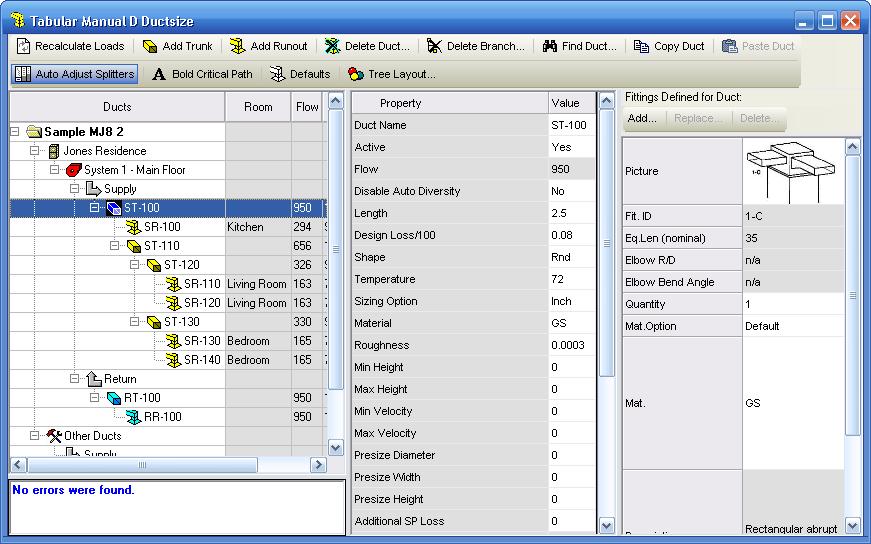
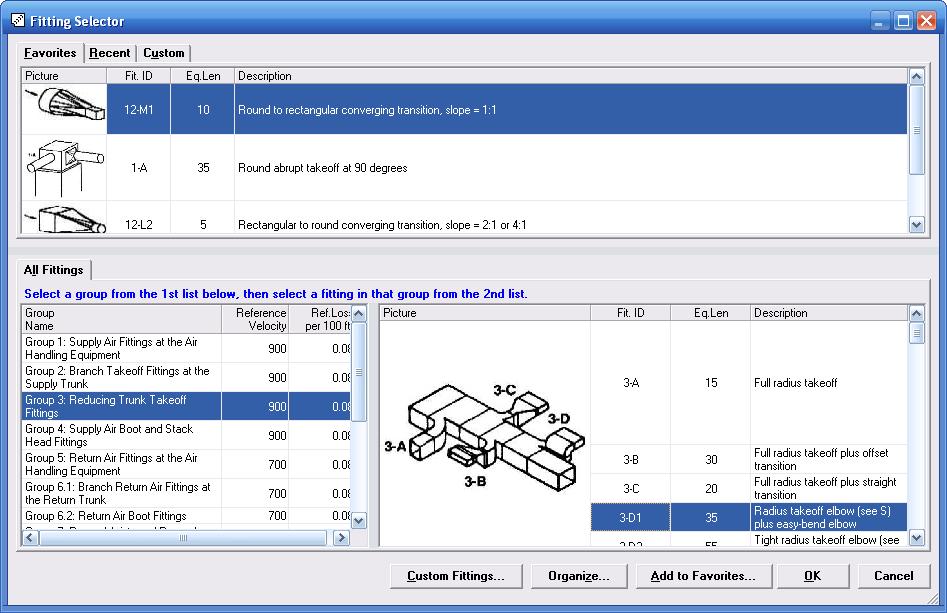
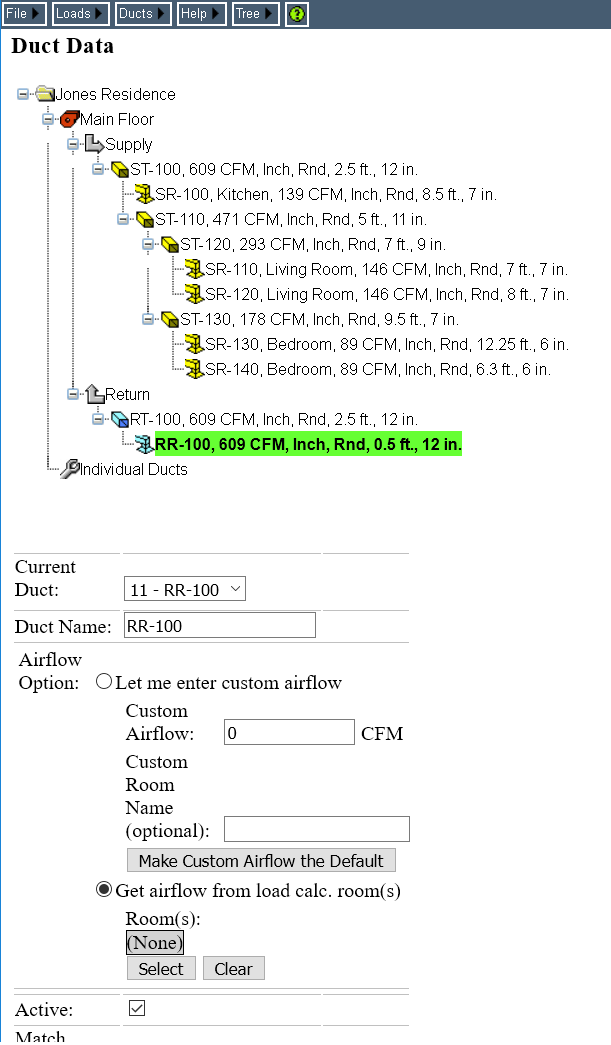
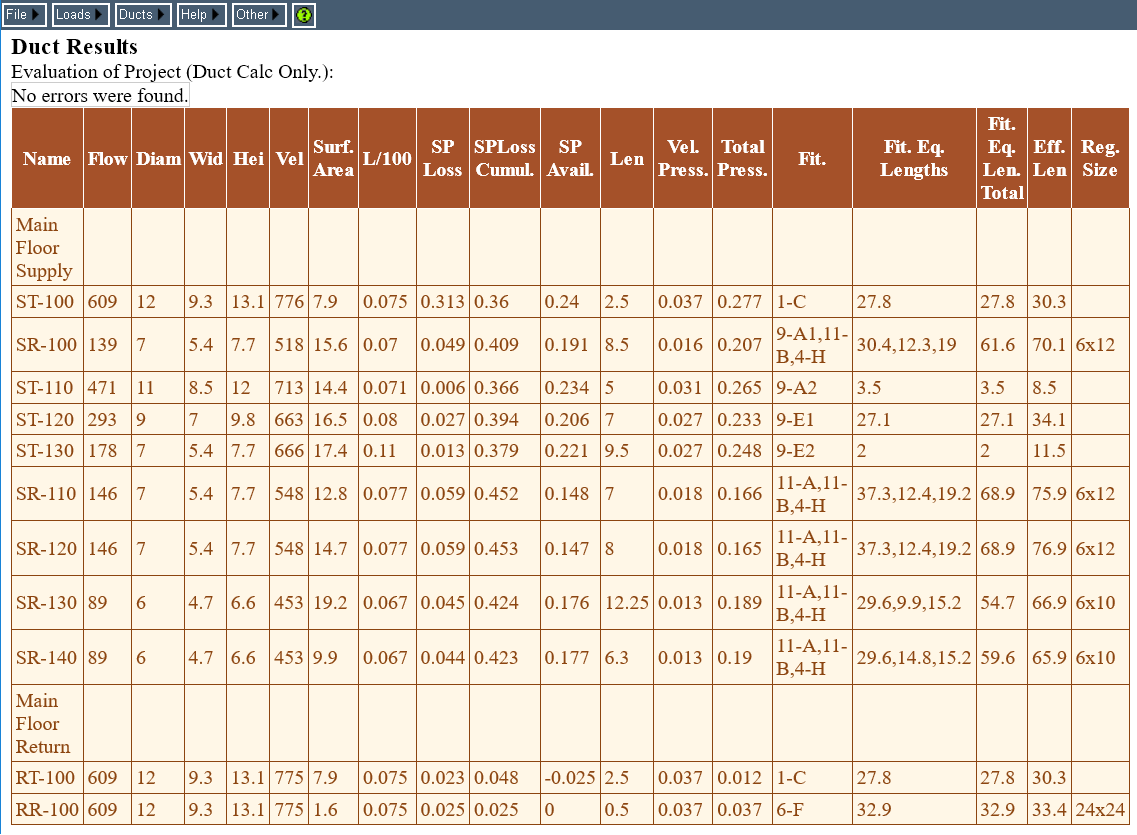
If you want to do a complete Manual D duct system analysis and include every duct section and fitting in the project, both Rhvac Desktop and Rhvac Online include Tabular Manual D Ductsize. This is a tabular input procedure as shown here where you can either enter your entire duct system or individual ducts. This unique tool includes a powerful Fitting Selector that makes it easy to select from hundreds of fittings from ACCA's Manual D.
Manual D Ductsize Online
For those who don't need the complete Rhvac Online J, D, and S capabilities, but still want a low cost online Manual D analysis tool, Manual D Ductsize Online is the product for you. Manual D Ductsize Online is simply Rhvac Online with only the Tabular Manual D features activated. For those who want to do a graphic Manual D analysis, consider adding the Drawing Board and Graphic Manual D Ductsize options to Rhvac Desktop. You can order Manual D Ductsize Online here.
Drawing Board and Graphic Manual D Duct Sizing
The basic version of Rhvac Desktop and Rhvac Online provide complete Manual J load calculations and Manual D duct sizing using a simple manual entry tabular input process. Rhvac Online has no drawing capability and the basic version of Rhvac Desktop provides no drawing capability, except at a demonstration level.
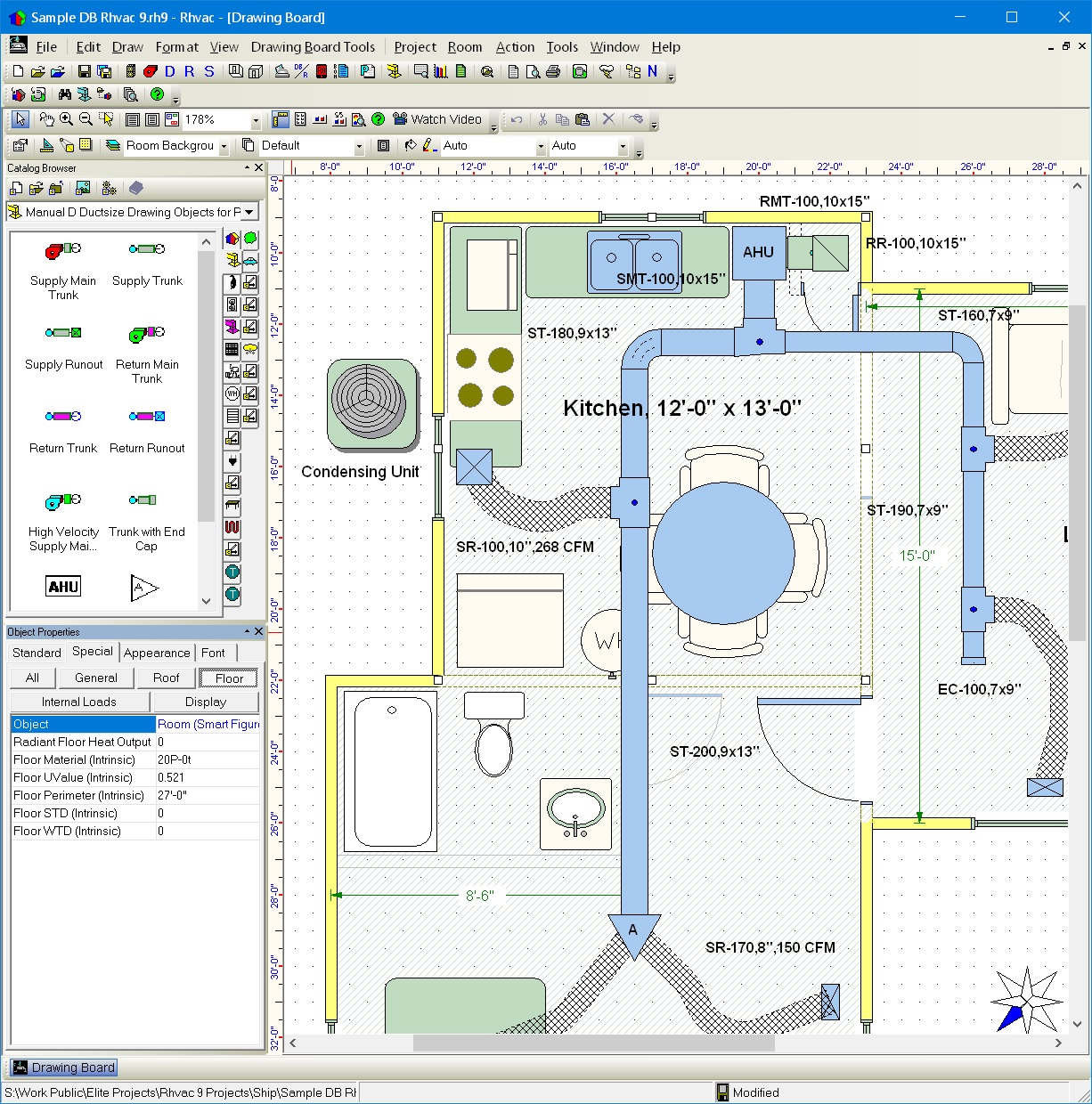
To be able to draw floor plans and have duct sections automatically placed and sized on a drawing, you need to activate both Drawing Board and the Graphic Manual D Ductsize modules in Rhvac Desktop. These modules are already inside of basic Rhvac Desktop, but operating at a demo level that limits the size of the building and number of duct sections that can be drawn.
Once these modules are activated, you can draw and calculate any size floor plan desired with any number of duct sections required. See the sample drawing here.
Start with Full Drawing Capability or just Basic Rhvac?
A major feature of Rhvac Desktop is how well it works in either a manual entry or graphic entry mode. Those new to computerized load calculations often wonder whether they should start with manual entry versions of Rhvac or go ahead and start with Rhvac Desktop and its graphic options such as Drawing Board and Graphic Manual D Ductsize.
It is easier to learn a manual data entry system where you type your room dimensions in than a drawing system because a drawing system (regardless of vendor) involves all the additional concepts of computer aided drafting (CAD) such as layers, sheets, scales, snap to grids and much more. Learning both Manual J and CAD concepts all at once is harder than just learning Manual J input procedures. If there is not an immediate need to create drawings, then it is easier and less initial expense to get started with Rhvac Online or the basic Rhvac Desktop software and then add on drawing features as you progress. Should you start with basic Rhvac Desktop and then add Drawing Board later, you can make use of a special Drawing Board feature that can convert a manual entry project automatically into a drawing based project as seen in this video.
What if you need to create drawings right away with your calculations, can you learn all this at once? Yes, many people are able to learn the drawing system using just the user manuals and free videos on the web site. But training can be very helpful if you want to learn as fast as possible. See this page for a list of companies that provide class room training on Elite Software, and check this web site if interested in web based training.
So what should you start with? If you need drawings right away, take advantage of the Rhvac Desktop, Drawing Board, and Graphic Manual D Ductsize discounted combo price of $999.
If you don't need drawings right away, but want to save $98 over the long haul, still consider going with the discounted combo deal. After all, you don't have to learn the advanced CAD features right away with the combo if you don't need to. You can still just use basic Rhvac Desktop to start with even if you buy the combo.
If you don't need drawings right away and/or money is tight, go with either basic Rhvac Desktop for $599 or Rhvac Online for $239 per year. You will still be able to do full Manual J loads, complete Manual D duct sizing, Manual S equipment selection, and sales proposals. Plus you can add on Drawing Board and Graphic Manual D Ductsize to Rhvac Desktop at any convenient later time.
Use Rhvac Online, Rhvac Desktop or Both?
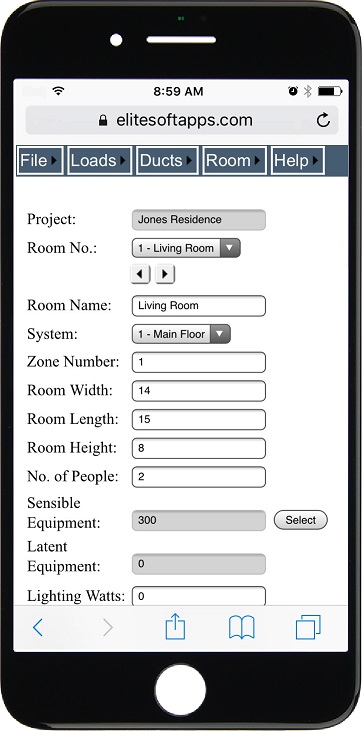
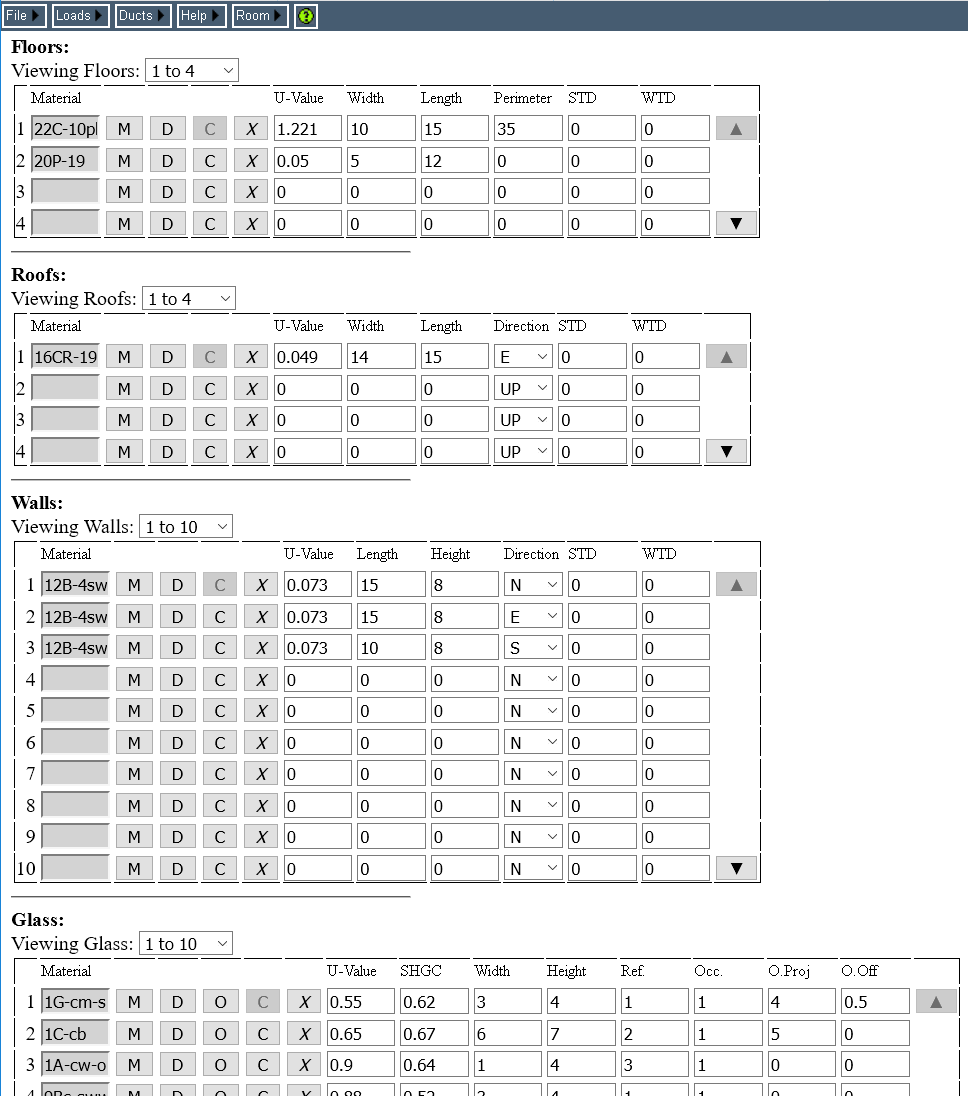
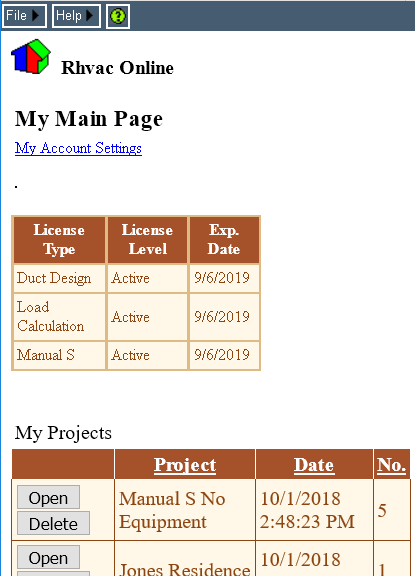
Rhvac Online is the basic manual entry version of Rhvac Desktop formatted to run on all types of internet devices including iPads, tablets, computers and smart phones. Rhvac Online has all the major features of the basic Rhvac Desktop software. With Rhvac Online, projects are stored in the "cloud" and are available to you from any internet connection. Projects can also be saved to your local computer and can be uploaded and downloaded from different computers as desired. Unlimited project file storage is allowed. You can use the project database of Rhvac Online to store backup copies of all your projects.
A designer could easily use just Rhvac Online to do all his Manual J, D, and S reports. However, Rhvac Online cannot show as much information on one screen as does Rhvac Desktop, and you must be connected to the internet when using Rhvac Online.
The ideal situation is to have both Rhvac Desktop and Rhvac Online. In this way, you can work on the same projects in the most efficient way possible no matter where you are. Use Rhvac Online when you are out in the field and you want to do a quick load calculation on your phone or tablet or just the check over a project you have already done on your office computer. And later, access that same project on your computer at home with a large screen and keyboard using Rhvac Desktop.
Rhvac Online gives you the ability to do projects completely from scratch or just review and edit projects you have already done elsewhere. It can even upload projects that were done graphically and let you review and edit all data that is non-graphic and download it back down as well. Rhvac Online gives you the ability to access all your projects anywhere and anytime you can get on a web connected computer or mobile device.
Rhvac Online is extremely handy to the HVAC professional that wants all his projects available to him at all times, along with the ability to review, edit, and calculate new results.
Basic Sales Proposals
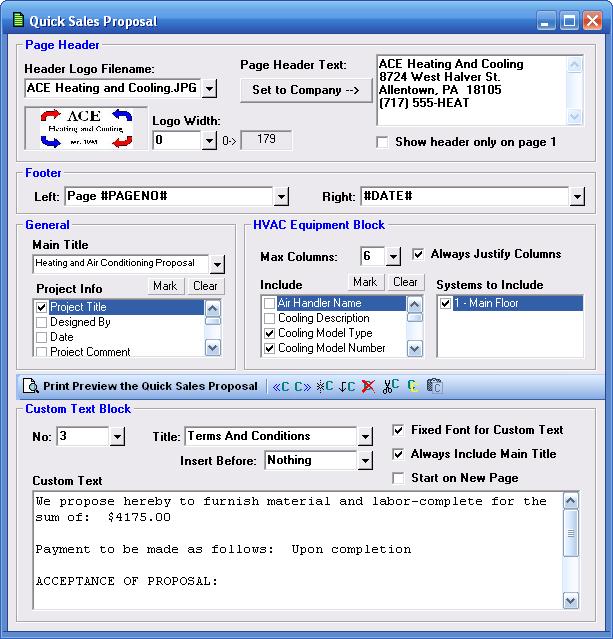
Included at no additional charge in Rhvac Desktop is a Quick Sales Proposal option that is primarily used to create basic sales proposals. This option is very simple to use as the designer merely checks boxes to indicate what information to include in the proposal. Standard proposal text can be saved and selected to print as well. The input window shown here shows the simple inputs needed to create the sample proposal shown after the input screen. The report shown here is produced from the Quick Sales Proposal window. The basic sales proposal is not currently in Rhvac Online, but may be added in the future if sufficient demand exists.
Graphic Sales Proposals
For those who want to create the most powerful and graphic sales proposals possible, considering adding to Rhvac Desktop the optional Proposal Maker software for just $299. Proposal Maker gives you complete control over all aspects of a proposal's appearance. Graphics and text can be mixed in any way desired. This kind of customization capability requires more user input than the built-in basic proposal of Rhvac Desktop, but for those wanting the most professional appearance possible, Proposal Maker is the way to do it. See more details and sample proposals here.
Bill of Materials Option
For estimating material and labor costs, consider activating the Bill of Materials module in Rhvac Desktop for only $299. Used just with Rhvac, a designer can select from thousands of parts and equipment items to create a detailed bill of materials with both material and labor cost estimates. If Drawing Board and Graphic Manual D Ductsize are also activated, the BOM module can do automatic material take-offs from Drawing Board drawings which is especially useful for picking up ductwork items. Bill of Materials is not available for Rhvac Online, but may be offered in the future if sufficient demand exists.
The Bill of Materials module is very powerful in that it can import material lists from virtually any supplier so that you can add thousands of new items easily at anytime. In addition, the reports are completely customizable with over 70 columns of data that can be turned on and off as needed. Know your true costs for all your projects so you can profitably price your work. See more details on the Bill of Materials module here.
Equipment Selection and Manual S Requirements
Both Rhvac Desktop and Rhvac Online are supplied with HVAC model performance data for all the manufacturers listed with AHRI. These data cover nearly 2 million models of standard air conditioners, heat pumps, ground source heat pumps, furnaces, and boilers from over 250 HVAC manufacturers. These data are updated every few months, and Rhvac automatically downloads the new equipment data files as they become available. There is no cost to Rhvac users for the updated equipment data. Click here to read more about expanded ratings data and where you can obtain it.
AHRI data typically include a model number, nominal capacity, SEER or other efficiency numbers, and the AHRI reference number if applicable. Additionally, pictures of models for some of the more popular manufacturers such as Carrier, Trane, Goodman, Lennox, Armstrong, Rheem, York, Climate Master, Waterfurnace, Florida Heat Pump and others are included as well. Model data and pictures can be selected to appear in the reports for each system of an Rhvac project.
Some projects require selecting equipment using more than just the nominal ratings as obtained from AHRI model data. Manual S is an ACCA publication that describes how to select properly sized residential heating and cooling equipment for all types of situations. It emphasizes the importance of using performance data sometimes called "expanded ratings data" that document the sensible, latent or heating capacity of a model for a wide variety of operating conditions. It suggests sizing strategies that differ according to the type of equipment being used. And it provides steps for these different strategies that involve things such as considering whether the latent load is large or small compared to the sensible, whether the cost of cooling or heating is of more concern, and whether cooling comfort, heating comfort or efficiency is the most important consideration. Manual S explains how to utilize important techniques such as converting latent capacity to sensible capacity when conditions allow for it, and includes rules for allowed oversizing percentages that vary according to climate and type of equipment. Manual S can be ordered from ACCA here.
Both Manual J and Manual S are now included in the 2009 International Residential Code (IRC). Chapter 14 of the IRC, Heating and Cooling Equipment: M1401.3 Sizing. Heating and cooling equipment shall be sized in acordance with ACCA Manual S based on building loads calculated with ACCA Manual J or other approved heating and cooling methodologies.
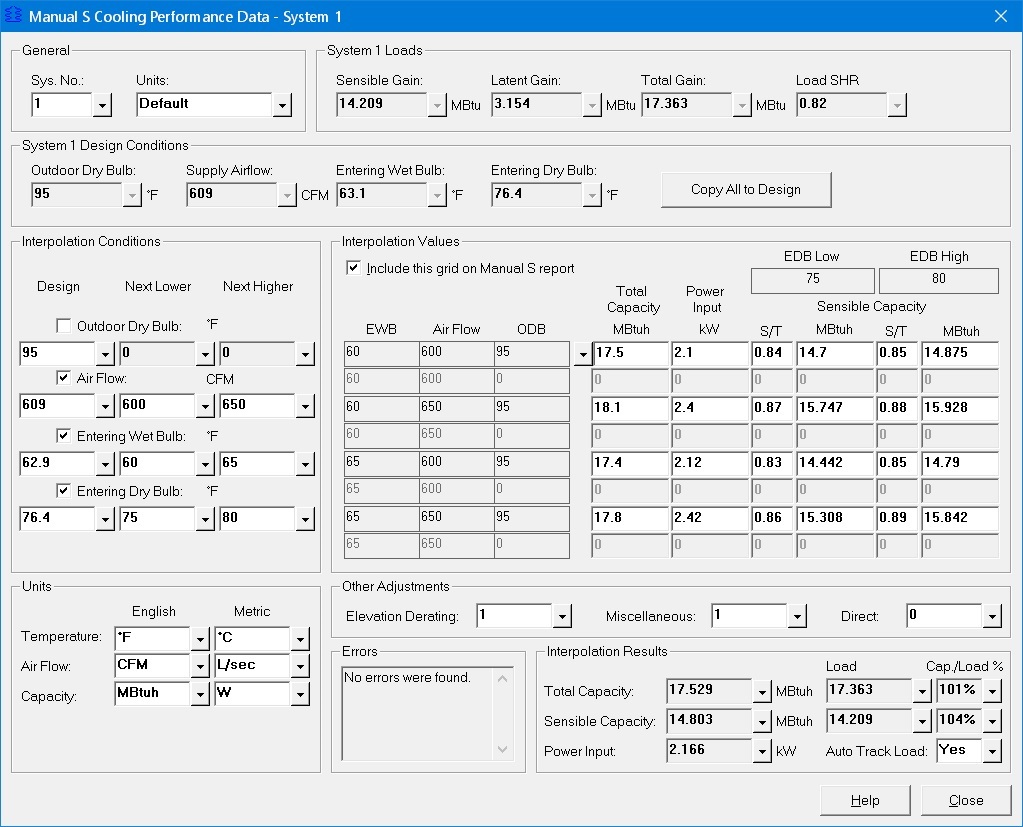
Both Rhvac Desktop and Rhvac Online provide the ability to interpolate from expanded ratings of equipment and create an Equipment Data report showing Manual S selection parameters and a Manual S Report that certifies that all equipment has been selected per Manual S requirements. This report also shows all the associated conditions needed for obtaining specific model performance data from expanded ratings data.
Manual S Calculator Online
For those who don't need the complete Rhvac Desktop or Rhvac Online J, D, and S capabilities, but still want a low cost online Manual S report tool, Manual S Calculator Online is the product for you. Manual S Calculator Online is simply Rhvac Online with only the Manual S features activated. You can order Manual S Calculator Online here.
International Residential Code (IRC)
Many states, counties, cities and townships around the U.S. are now following some version of the IRC code. The International Residential Code (IRC) is a comprehensive, stand-alone residential code that creates minimum regulations for one and two family dwellings of three stories or less. It brings together all building, plumbing, mechanical, fuel gas, energy and electrical provisions for one- and two-family residences. The IRC also provides a prescriptive approach (i.e., a set of measures) and a performance approach (i.e., energy modeling) for determining compliance.
Both Manual J and Manual S are now included in the 2009 International Residential Code (IRC). Chapter 14 of the IRC, Heating and Cooling Equipment: M1401.3 Sizing. Heating and cooling equipment shall be sized in acordance with ACCA Manual S based on building loads calculated with ACCA Manual J or other approved heating and cooling methodologies. Use Rhvac to help comply with both the Manual J and Manual S requirements of the 2009 IRC. See more about the IRC here: https://www.energystar.gov/index.cfm?c=bldrs_lenders_raters.nh_IRC
International Energy Conservation Code (IECC)
The International Energy Conservation Code (IECC) encourages energy conservation through efficiency in envelope design, mechanical systems, lighting systems and the use of new materials and techniques. The IECC is similar to the energy related components of the IRC and is even referenced within the IRC, though the two codes are not always identical.
Each state has its own energy code requirements. State energy codes are often based on a version of MEC or IECC (e.g., the 1992 MEC, the 2001 IECC, etc.); though it is worth noting that a few states have no requirements or may only have an energy code as a recommended practice. To see what your state follows concerning the IRC and IECC, check this web page at the Building Codes Assistance Project.
Rhvac helps you comply with state energy codes by creating input files that energy code compliance programs such as ResCheck, Energy Gauge, and RemRate can import. The advantage of this feature in Rhvac is that you do not have to reenter the data over again for any Rhvac project that you wish to use in one of the above energy programs.
Code Enforcement
Many states have code laws that technically cover the entire state, but are often not enforced in certain areas of the state simply due to lack of resources. Some contractors take advantage of this lack of enforcement and disregard various code points as they believe there are no potential repercussions from doing so. While it is true that no immediate penalties are likely to occur in a low enforcement area, it is quite possible that some future problem with the building will arise that causes the owner to investigate details of the installation. If the investigation, even done years later, determines that various points of the governing state code were flagrantly ignored at the time of the installation, a Mechanical Integrity violation could be invoked causing significant fines and penalties.
The Mechanical Integrity concept is a general requirement that a contractor follow all applicable standards in the performance of his work relating to equipment, piping, instrumentation, electrical systems, and other physical items. Contractors who ignore their state's own implementation of the IRC and IECC codes, no matter how laxly enforced, run the risk of a future Mechanical Integrity violation.
Equipment Comparisons and Operating Costs
As mentioned above, both versions of Rhvac provide nice built-in equipment selection capabilities. But if you need to compare one specific model or a type of model against another and perform an economic analysis of operating costs, then the Energy Audit program is what you need. It can import all necessary data from both versions of Rhvac or be used stand alone. By calculating pay back and return on investment, Energy Audit is perfect for showing your customers why high efficiency equipment is worth paying more for. See more details on Energy Audit here.
Geothermal Design
Ground source heat pumps and direct exchange heat pumps that use geothermal energy are the most efficient HVAC units on the market today. The U.S. government is so impressed with geothermal heat pumps that a major tax incentive is being offered to help make these units more affordable.
Calculation of Manual J HVAC loads for buildings using geothermal equipment is done no differently than for any other type of HVAC equipment. Rhvac calculates perfectly for all types of geothermal equipment. What is different about ground source heat pumps is that a "loop" design also needs to be performed. A loop is usually polyethylene tubing that is buried in the ground or submerged in a pond. This loop connects the heat pump to the ground or water. The length of tubing required in the loop is a special calculation. Elite Software offers a program called ECA (Earth Coupled Analysis) for the calculation of ground loops in horizontal, vertical, and "slinky" configurations. ECA can import all necessary data from Rhvac or be used stand alone. See more details on ECA here.
Direct exchange heat pumps use copper tubing to connect the heat pump to the ground. Each manufacturer provides its own chart for sizing copper loops and thus loop sizing software is not required. Both ground source and direct exchange heat pumps are more expensive than standard air source heat pumps. A program such as Elite's Energy Audit is a great aid in showing customers the operating cost savings of all types of geothermal heat pumps. See more details on Energy Audit here.
Up to Date with the Latest Construction Techniques
Both Rhvac Desktop and Rhvac Online include a wide variety of spray foam and Structural Insulated Panel (SIP) roofs and walls from which to choose. These new roof and wall selections make it easy to do load calculations for the increasing number of houses being built with these technologies. In addition, many more window selections are included with both versions of Rhvac beyond what is in the standard Manual J book.




 Drawing Board
  Proposal Maker
  Energy Audit
 Graphic Manual D Ductsize
 Bill of Materials
 ECA
ECA  PsyChart
 GasVent
  Chvac
Chvac HVAC Solution